
Take an FTP test
The ramp test and the 20-minute test, how each result is worked out, and how to save it.
Updated 4 November 2026
FTP is the power you could hold for about an hour. Form’s ready-made workouts, and any workout written as a percentage of FTP, take their watts from it, so an up-to-date number keeps every session at the right effort. Form has two built-in FTP tests you ride on the trainer: a ramp test and a 20-minute test. Both are ordinary rides, and the result is worked out from your power alone.
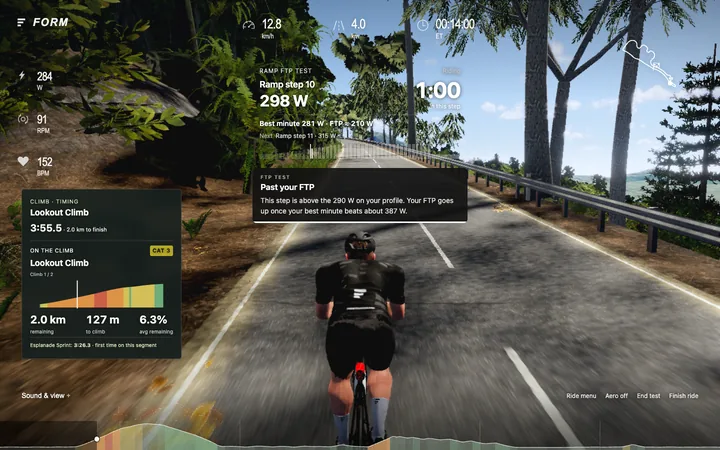
Where to find it
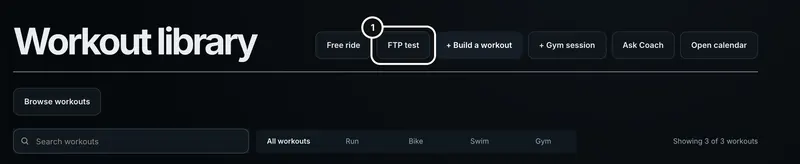
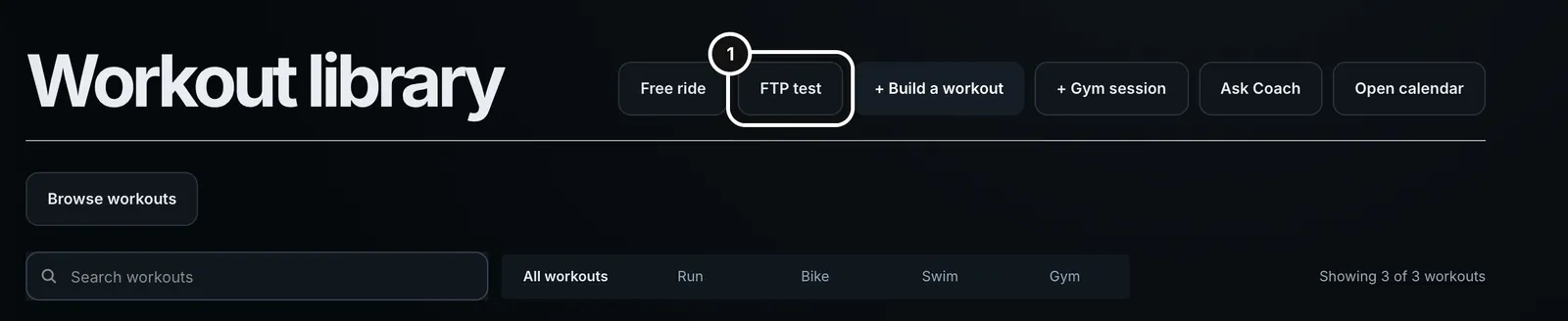
The two tests sit next to Free ride in the trainer lobby’s Workout tab. The Workouts page has an FTP test button that opens the trainer straight on the ramp test. You need a connected trainer to ride either one (see “Set up the trainer”).
Open the FTP test
1On the Workouts page, press FTP test. It opens the trainer with the ramp test selected.
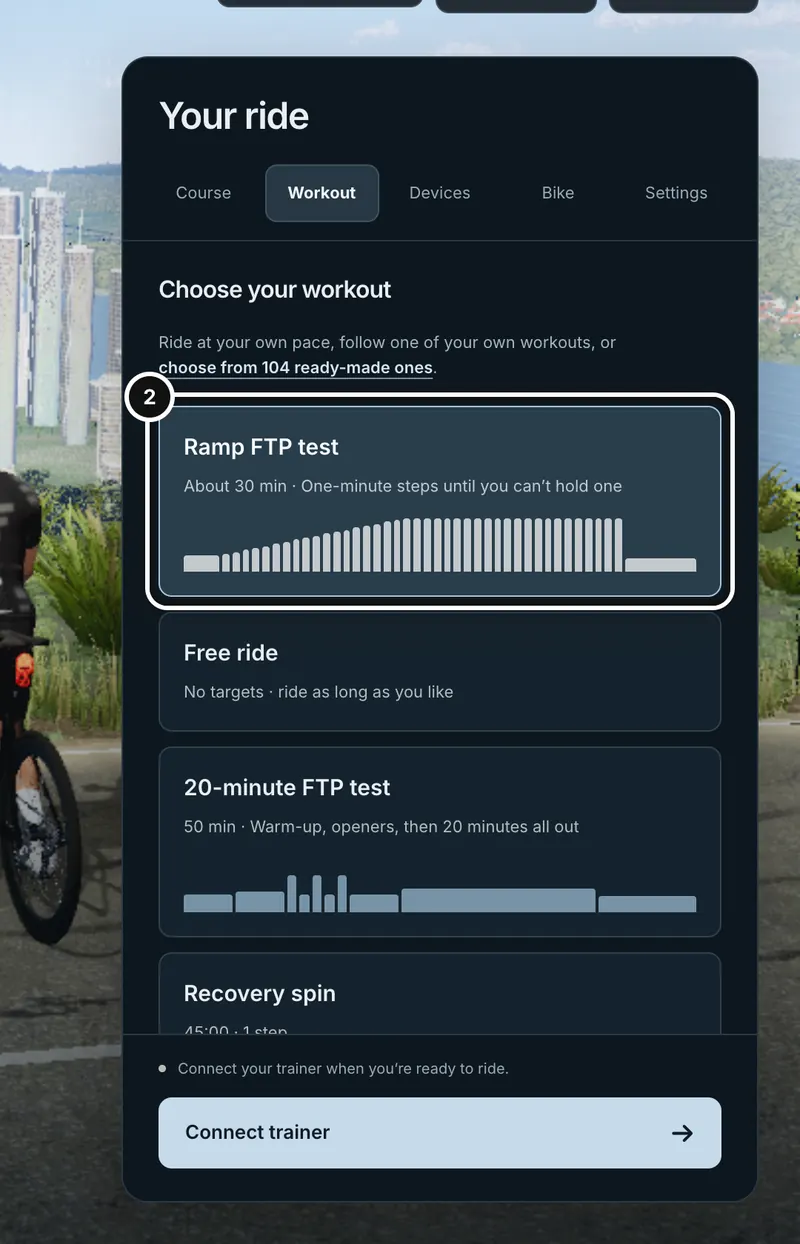
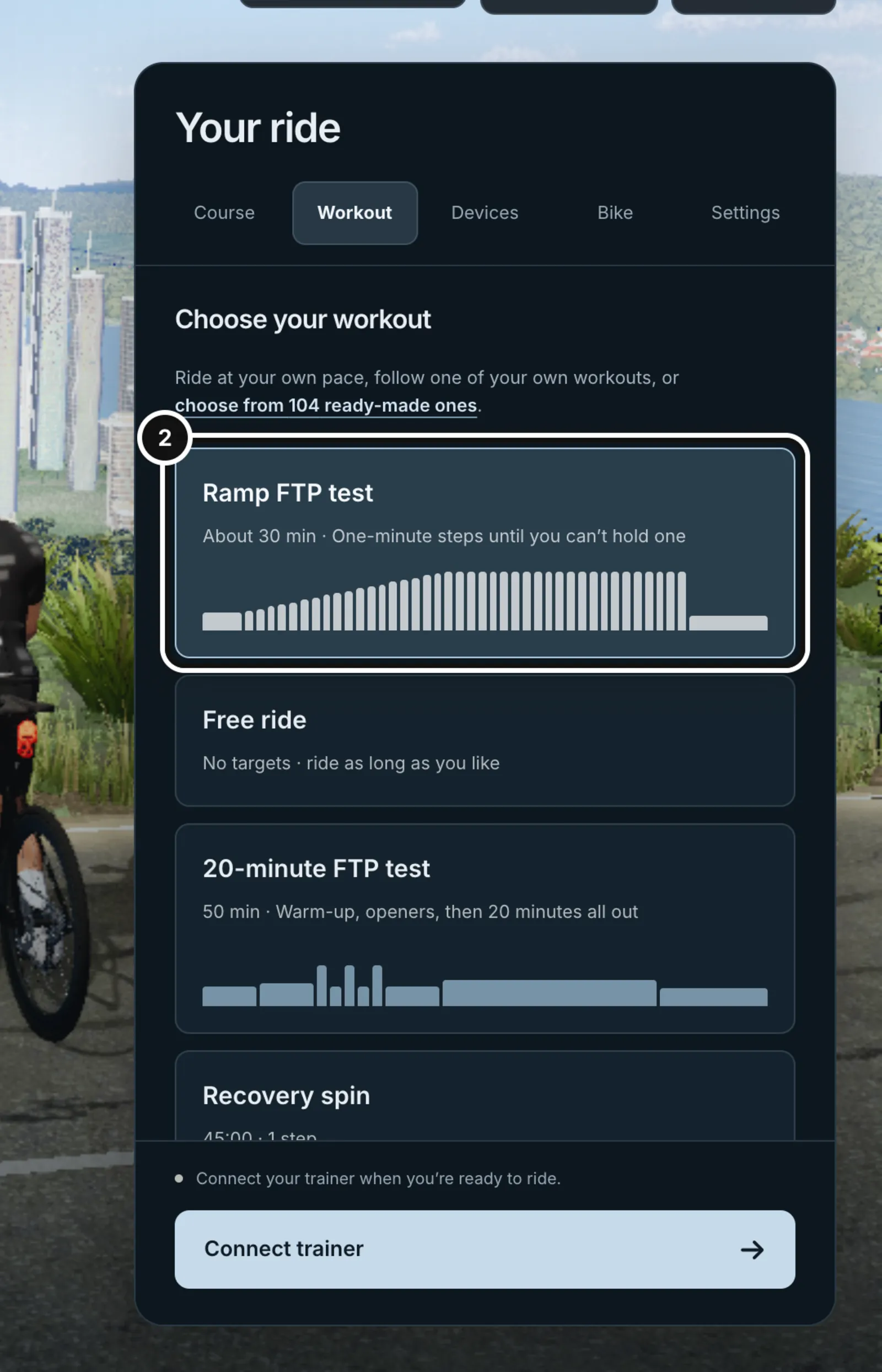
2In the lobby’s Workout tab the Ramp FTP test is selected. Check your course and connect your trainer.
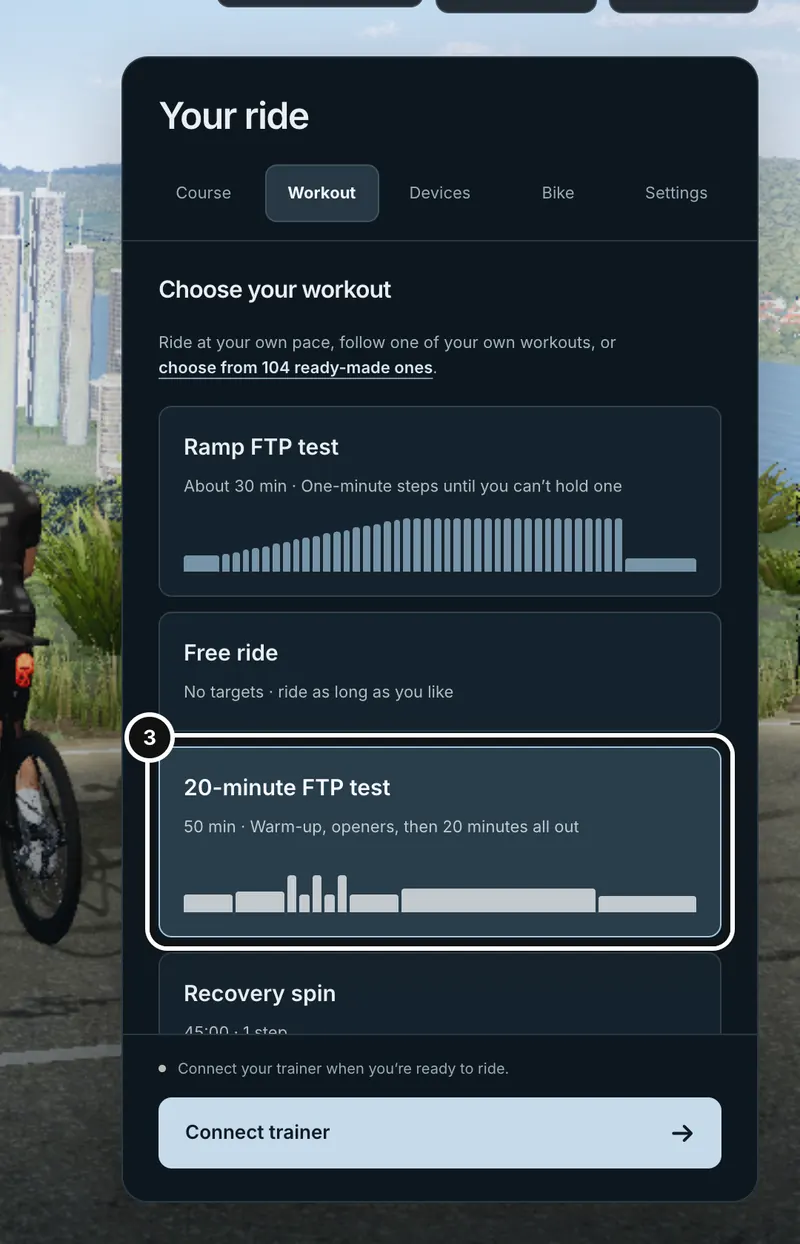
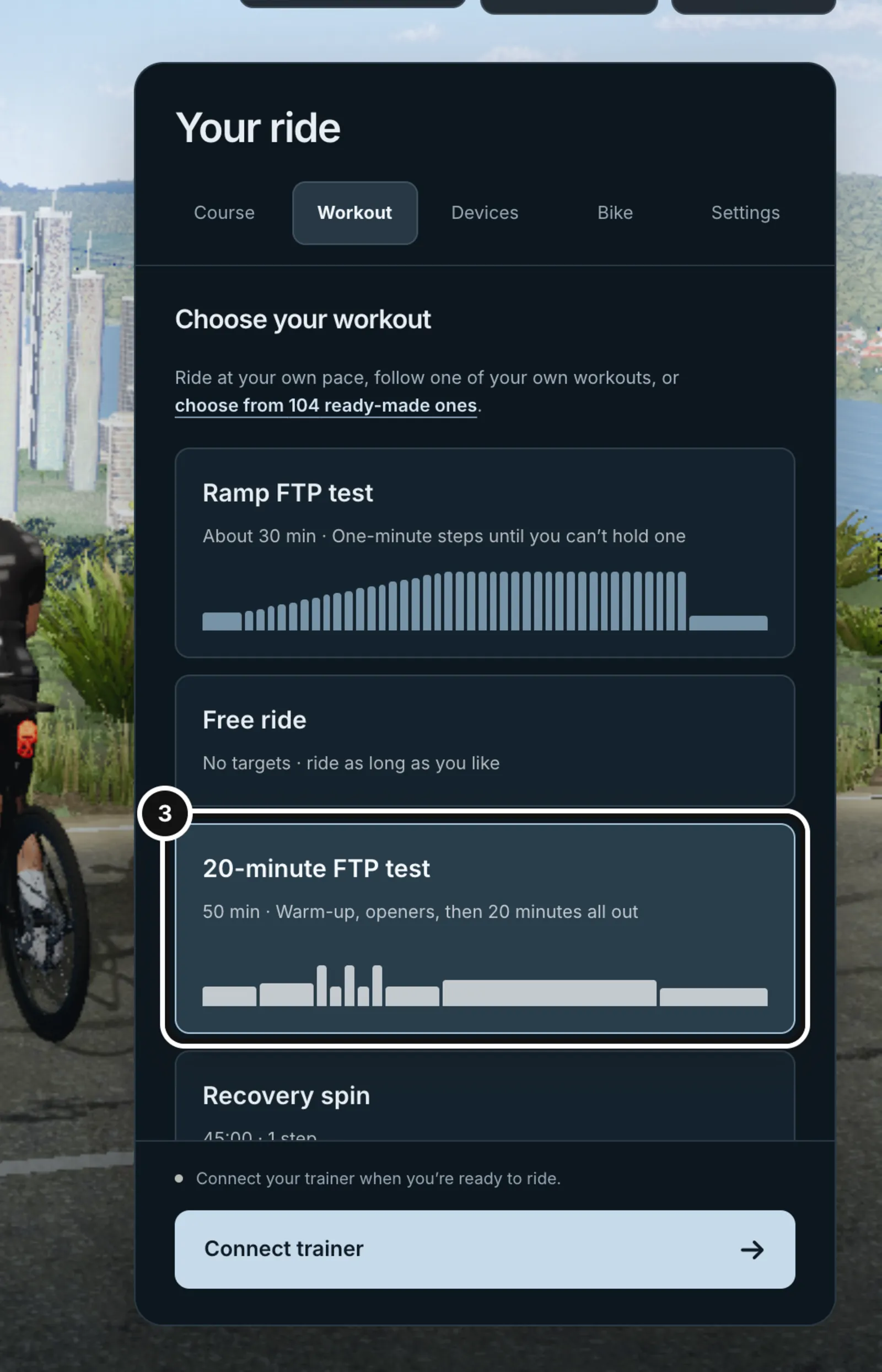
3Prefer the 20-minute test? Select it here instead, then press Start ride.
Which test to take
- Ramp test: about 30 minutes, finishing when you cannot hold a step. Resistance is set for you in one-minute steps, so there is no pacing to judge. Your FTP is 75% of your best minute.
- Twenty-minute test: 50 minutes in total, with 20 minutes all out. You set the pace and have to judge it. Your FTP is 95% of your 20-minute average.
Either test is a good choice. The ramp is shorter and easier to get right because Form sets the effort for you. The 20-minute test suits you if you are practised at pacing a hard sustained effort, because the pacing is up to you.
The ramp test
- Warm up for 5 minutes at 45% of your current FTP (90 W if you have none).
- The ramp starts. Each step lasts one minute. The first step is 50% of your FTP and every minute adds 6% of it, never less than 10 W and never more than 30 W. With no FTP on your profile, the ramp starts at 100 W and adds 20 W a minute.
- Keep pedalling until you cannot hold the step. Stop pedalling, or press End test. The trainer drops to an easy cool-down target immediately so you can turn the cranks again.
- Spin easy for the 10-minute cool-down. Your result appears as soon as the ramp ends.
The ramp has a ceiling of 40 steps. Form works out your FTP as 75% of your best one-minute average power inside the ramp steps. The warm-up and cool-down never count.
How the ramp ends on its own
You can end the ramp yourself. Form also ends it if you fall clearly short of a step: after the ramp has run for 60 seconds, if your last 10 seconds average below 70% of the target, with readings for at least 8 of them. An auto-pause during the ramp (you stopped pedalling) also ends it. Ending the ride with Finish ride in the middle of the ramp ends the test too. Power takes a second or two to catch up with a new step, which is why Form waits a minute and a 10-second window before deciding.
The 20-minute test
- Warm up for 10 minutes: 5 at 50% of your FTP, then 5 at 60%.
- Three one-minute openers at 105% of your FTP, each followed by a minute at 50%. They are brisk, not all out.
- Spin 5 easy minutes at 50%.
- Ride 20 minutes as hard as you can hold. There is no target. Your trainer behaves like a flat road and the on-screen virtual gears make it harder or easier, so you set the pace. Start a little under what you think you can hold, then build.
- Cool down for 10 minutes. Your result appears when the 20 minutes end.
Without an FTP on your profile there are no watts to aim at, so every step before the 20-minute effort is ridden by feel. The flat road and virtual gears need a trainer with road simulation. On a trainer without it, the ride pauses for you to set resistance by hand, as it does for any step without a target.
The explanation cards
While you warm up, short cards appear under the workout guide: what FTP is, how this test runs, how your result will be worked out, and when to stop. Later come cues at the moments that matter: the ramp or the 20 minutes starting, passing the FTP on file, halfway, five minutes to go and the last minute. Each card shows for 15 seconds of ride time, so a paused ride holds it. Every number on a card comes from your own workout and results, and the cards hide while the Ride menu or the aero panel is open.
Your result
When the test ends, the result card in the Ride menu (and in the lobby afterwards) shows your FTP and how it was worked out: for example “75% of your best minute in the ramp, 280 W”, and how it compares with the FTP you went in with. If you paused during the effort it also warns that rest in the middle can make the number read high.
Nothing saves automatically. The card has one button, Save N W as my FTP, which updates your profile FTP. If Intervals.icu is connected, a tick box on the same card, “Also set my Ride FTP in Intervals.icu”, sets it there too. If Intervals fails, your Form save still stands and the card reports the two separately. Your Intervals key never leaves Form’s server.
A recovered ride gives the same answer, because the result is calculated from the workout and the second-by-second power, not from anything you pressed during the test.
When there is no result
- “The ramp ended inside 3 minutes, too early to estimate an FTP.”: a ramp needs at least 180 ridden seconds. Ride the test again when you are ready.
- “The 20-minute effort wasn’t finished, so this ride has no FTP.”: the clock did not get past the end of the effort. Any shorter average is a different test.
- “Too many power readings were missing to trust a result.”: a one-minute window needs readings for at least 54 of 60 seconds, and the 20 minutes need at least 90% of their seconds. Check your trainer’s connection and ride again. A missing reading is never counted as 0 W; real coasting is.
- Outside 50 to 1,000 W: Form shows the number but cannot save it, because a profile FTP must be in that range.
- You are offline or signed out: the card explains why it cannot save your FTP. In an offline ride, set your FTP in Profile once you are back online.
One-second spikes are limited so a single glitch cannot lift a ramp result: in the ramp, a second counts for at most 1.5 times its step’s target.
What happens next
After you save, every workout set as a percentage of FTP uses the new number, including the 104 ready-made workouts in the trainer’s library.
Common questions
- Which test should I do first?
- The ramp. It is shorter, and Form sets the effort, so there is no pacing to get wrong. The 20-minute test is better once you are practised at holding a hard effort evenly.
- Will my FTP change automatically?
- No. Nothing saves automatically. You press the Save button on the result card.
- I stopped pedalling and the test ended. Is that right?
- Yes. An auto-pause during the ramp ends the test, because stopping is how the ramp ends. Your best minute up to that point is your result, as long as the ramp ran at least 3 minutes.
- Can I do the test without an FTP set?
- Yes. The ramp starts at 100 W and adds 20 W a minute, and the 20-minute test’s earlier steps are ridden by feel.
- Does the test count as a ride?
- It is a normal ride. Save it to Form from Finish your ride if you want it in your training history.